Your favourite synths. A different way to play them.
Load an instrument or drop in a sample. Lay down a pattern. Give every step its own sound. A step sequencer with built-in plug-in hosting and sample tracks, right inside your DAW.
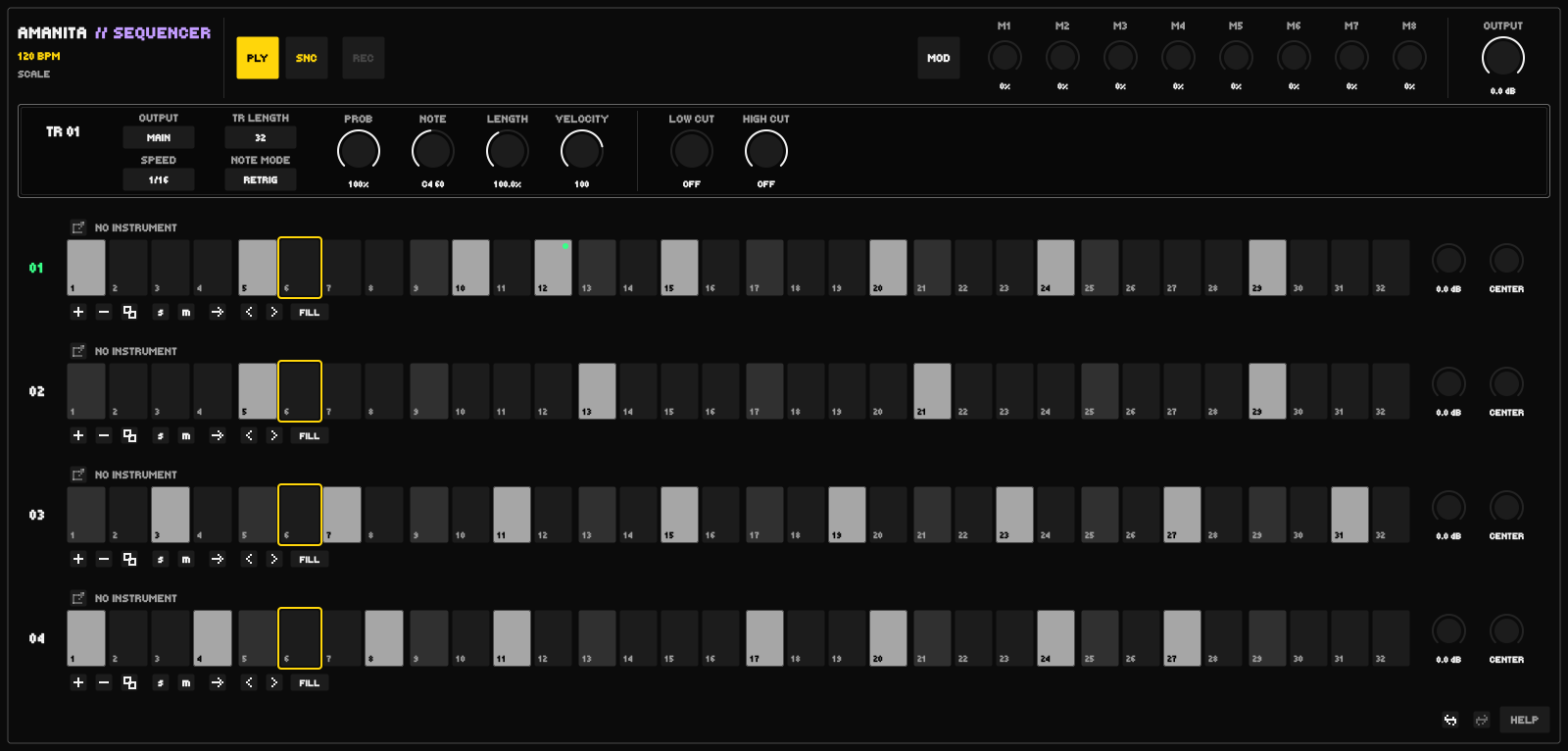
Four tracks. Independent patterns.Click the interface to view full size ↗
FLEXtracks, bounded by resources
256steps per track
08modulation sources
VST3 + AUnative plug-in hosting on Mac
01 / THE SEQUENCER
A pattern is more than a row of notes.
01
Compose one step at a time.
Set note, length and velocity for the track, then change individual steps. Hold a note for up to 128 steps or INF, as on Elektron, or Alt-drag instrument LENGTH to snap it to the tempo grid. Enter notes from your MIDI keyboard. Tie notes together, play legato with Slide, or retrigger each step.
NOTES02
Lock the sound to the step.
Open your synth from a step and change an automatable parameter. Parameter locks recall those values as the pattern plays, so a single instrument can change character from one step to the next.
P-LOCKS03
Connect your movement.
Route eight modulation sources to track settings and hosted instrument parameters. Adjust the amount for each route, and automate the sources from your DAW.
MODULATION04
Find the next variation.
Play forward, backward, random or a repeating random order. Set PROB for the track or individual steps to control their chance of playing. Select steps with Alt-click, middle-click, left and right together or by holding a step; add Shift for a grouped edit, or Alt-Shift-drag to paint the selection.
VARIATION05
Random notes. Your scale.
Choose a root note and scale, then randomize notes for all steps or only the active ones. Use a 1–4 octave range around the track note, or the full MIDI range. Every generated note stays within your selected scale.
SCALE06
Your samples. A new sequence.
Drag an audio file onto a sample track and shape its start, length, fades, pitch, velocity and filters. Zoom and pan the waveform for precise edits. Choose ONE SHOT, GATE, LOOP FORWARD or PING-PONG; TIE keeps the first source settings. Alt snaps START and LENGTH to a musical grid that follows BPM, without time-stretching. In either loop mode, live START, LENGTH and PITCH edits stay in sync. Samples are stored inside your DAW project.
SAMPLES07
Sequence together. Mix separately.
Choose an audio output for each track with the OUTPUT control. Send tracks to separate channels in your DAW for their own effects and mixing, or keep them together on MAIN. Multi-output availability depends on your DAW and plug-in format; see compatibility below.
OUTPUTS08
Play it in. Keep it in the pattern.
Press REC and play while your DAW runs: each note lands where you heard it, with its note, velocity and held length, from any MIDI channel. A chord keeps its first note, DAW loops record on every pass, and one pass is one Undo step. Hold REC, or right-click it, for the step recorder: one key per step, with the sustain pedal or SKP for a rest.
RECORDER09
Bring it in on the bar.
PLY switches the sequencer on and off while your DAW plays, always on the next bar line. SNC joins at the song position; TRG starts the pattern from step 1. Automate it as the Play parameter to arrange your patterns. The playing-step frame and the sample cursor show what you hear, even behind effects with latency, in hosts that report it.
PLAY
02 / YOUR WORKFLOW
Keep your synths. Change the approach.
01
Load Sequencer
Add Amanita Sequencer as an instrument in your DAW.
02
Bring your sound
Choose an installed synth, or add a sample track and drag in an audio file. Your synth's own editor opens when you need it.
03
Make a pattern
Enable steps, shape their notes and sound, then press Play in your DAW.
Turn on HELP and hover a control for a detailed English explanation. Prefer a full guide? Download the Russian PDF manual. Bring your own instruments and samples; third-party instruments and sample libraries are not included.
03 / COMPATIBILITY
At home in your DAW.
PlatformSequencer formatInstruments it hosts
macOS Apple SiliconVST3 / Audio UnitVST3 / Audio Unit
Windows x64 · previewVST3VST3
Linux x64 · experimentalVST3VST3
Route each track to its own output where your DAW supports multiple outputs. In AU hosts such as Logic, choose the multi-output variant when loading Sequencer; stereo cannot be expanded later in an existing instance. On Mac, run your DAW natively on Apple Silicon and use instruments with arm64 support. Windows and Linux need x64 VST3 instruments; real-DAW testing on these platforms is still pending. Linux targets Ubuntu 22.04-class systems with glibc 2.35+ and X11/XWayland. Rosetta and CLAP are not supported.
04 / FREE DOWNLOADS
Make something unexpected.
Free for personal and commercial music production. No account, payment or activation required.
An actively developed preview. Back up your projects before updating: projects re-saved in 0.1.0 cannot be reopened in 0.0.9 or older. Read the installation notes for your platform.